
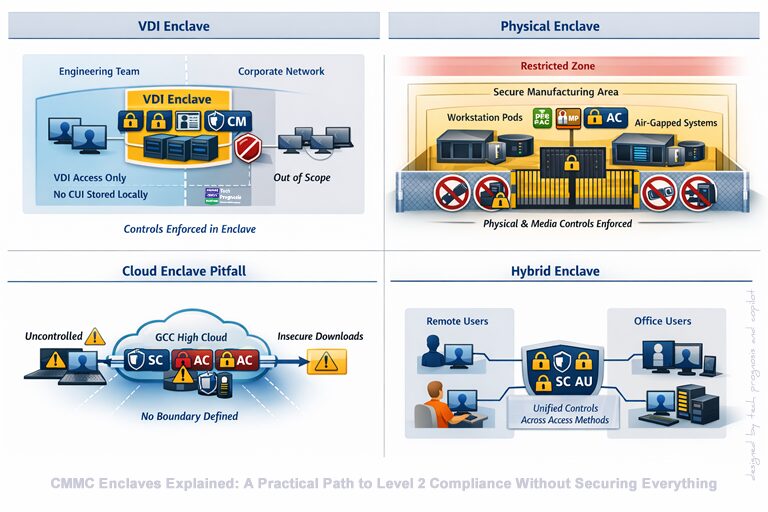
CMMC Enclaves Explained: A Practical Path to Level 2 Compliance Without Securing Everything
For many defense contractors, CMMC Level 2 feels intimidating. You hear phrases like 110 practices, NIST SP 800‑171, assessment-ready, and DoD assessments, and it can sound like your entire business needs to be rebuilt from the ground up.
Here’s the good news: it probably doesn’t.
Most small and mid-sized organizations do not need to secure their entire enterprise to meet CMMC Level 2. Instead, they can use a focused, defensible strategy called a CMMC enclave—a way to protect Controlled Unclassified Information (CUI) – the sensitive data the DoD wants you to protect – without turning the rest of the business upside down.
Think of it this way: instead of installing airport-style security in your entire office building, you build a secure vault for your valuables. That vault is your enclave.
This article explains what a CMMC enclave really is, how it applies specifically to CMMC Level 2, real-world enclave setup examples, how assessors evaluate them, and how to get started without overengineering your environment.
What Is a CMMC Enclave (in Plain English)?
At its core, a CMMC enclave is a clearly defined environment—technical, physical, or procedural—where CUI is stored, processed, or transmitted, and where all required CMMC Level 2 controls are applied.
Everything inside the enclave is in scope for the assessment. Everything outside is not—as long as CUI cannot flow into it.
An enclave has four essential characteristics:
- Defined boundaries
You can clearly explain where the enclave starts and stops. - Authorized access only
Only approved users, devices, and applications can interact with CUI. - Controlled data flow
CUI does not leak into email systems, file shares, personal devices, or shadow IT. - Assessable controls
All Level 2 practices can be demonstrated inside the enclave with evidence.
What an Enclave Is Not
To avoid costly misunderstandings:
- An enclave is not hiding data from assessors
- It is not skipping controls
- It is not automatically created by using GCC High or a cloud provider
- It is not a loophole
Assessors expect enclaves—as long as they are well-designed and well-documented.
Why Enclaves Exist in the CMMC Model
CMMC is about trustworthy handling of CUI, not punishing small businesses with enterprise-sized security programs.
The DoD recognizes that:
- Many contractors only touch CUI in small parts of the organization
- Applying 110 practices across every system is expensive and unnecessary
- Segmentation aligns with long-standing cybersecurity principles like least privilege and need-to-know
CMMC Level 2 is directly aligned with NIST SP 800‑171, which already emphasizes scoping, boundary definition, and controlled access.
Business Benefits of Enclaves
For leadership and budget holders, enclaves deliver real advantages:
- Reduced assessment scope – fewer systems, fewer controls to prove
- Lower implementation cost – security investment is concentrated where it matters
- Faster readiness – teams can become compliant in months, not years
- Minimal disruption – the rest of the business keeps working as usual
As a simple example: your receptionist does not need access to engineering drawings. An enclave ensures they never have it—and never need controls applied to their workstation.
Common Types of CMMC Enclaves (With Real Examples)
Most organizations use a combination of these enclave types.
1. Technical Enclaves (Most Common)
Technical enclaves rely on IT architecture to isolate CUI.
Typical designs include:
- Segmented networks or VLANs
- Virtual Desktop Infrastructure (VDI)
- Dedicated cloud tenants
- Strong identity-based access controls
Example: Engineering VDI Enclave
- Engineers access CUI only through a secured virtual desktop
- No CUI is stored on local laptops
- USB, clipboard, and printing are restricted
- MFA is enforced for all access
Outside the VDI, laptops are considered out of scope.
This is one of the most defensible and assessor-friendly enclave designs.
2. Physical Enclaves
Physical enclaves rely on controlled spaces.
Typical designs include:
- Locked rooms or labs
- Badge-restricted access
- Visitors escorted and logged
- Stand-alone workstations
Example: Controlled Manufacturing Area
- CUI drawings only accessible from locked workstation pods
- No phones, cameras, or removable media allowed
- Access limited to cleared personnel
- Systems not connected to corporate Wi-Fi
Physical enclaves work best in environments with fixed locations and workflows.
3. Administrative / Process Enclaves (Supporting Role)
Administrative controls support enclaves but rarely stand alone.
Examples include:
- Defined data handling rules
- Formal role definitions
- Workflow restrictions
- Document marking and routing procedures
Important reality: policies alone do not create an enclave. They must support technical or physical controls.
What Can—and Cannot—Be Inside a CMMC Level 2 Enclave
Understanding scope boundaries is critical.
You Can Include:
- CUI repositories
- Engineering and technical data
- Controlled email or collaboration tools
- Secure backup systems
You Cannot Include:
- Unrestricted endpoints
- Personal devices without controls
- Consumer cloud storage
- Unauthorized applications or plugins
The Golden Rule of Scoping
If CUI can flow to it, it is in scope.
Assessors will look for technical enforcement, not intention.
How Enclaves Reduce Cost and Complexity
CMMC Level 2 requires 110 practices across 14 domains. Applying those to an entire enterprise is expensive.
Enclaves change the equation.
Cost Difference (Typical Example)
| Approach | Systems in Scope | Cost | Complexity |
| Full Enterprise | 200+ endpoints | Very High | High |
| Enclave-Based | 15–30 systems | Manageable | Controlled |
Operational Benefits
- Non-CUI staff need less training
- Fewer controls to document
- Smaller evidence packages
- Faster remediation cycles
Most importantly: employees outside the enclave can work normally, reducing friction and resistance.
Common Mistakes Organizations Make With CMMC Enclaves
Assessors see these mistakes often.
- “We Use GCC High, So We Have an Enclave”
Cloud platforms do not define boundaries by themselves. You must still control users, devices, and data paths.
- Uncontrolled Data Flow
Downloading CUI to laptops, emailing it externally, or syncing it to unmanaged tools immediately defeats the enclave.
- Overloading the Enclave
Putting everyone in the enclave erases the cost benefit and increases assessment burden.
- Weak Identity and Access Management
No MFA, shared accounts, or poor offboarding are instant red flags.
- Poor Documentation
If you cannot explain and prove how the enclave works, it may not be accepted.
Real‑World CMMC Enclave Case Studies (Level 2 Aligned)
The concept of a CMMC enclave makes sense on paper—but it’s easiest to understand when you see how real organizations apply it. Below are representative, real‑world enclave scenarios that reflect how defense contractors successfully scope, implement, and defend their environments during CMMC Level 2 readiness and assessments.
Note: These examples are anonymized composites based on common assessment outcomes and assessor feedback. Details are simplified for clarity, but the approaches are realistic and defensible.
Case Study 1: Small Engineering Firm Using a VDI Enclave
Organization Profile
- 45‑person engineering services firm
- Supports DoD prime with design and analysis work
- Only 12 users require access to CUI
- Limited internal IT staff
The Challenge: Originally, the company assumed they would need to bring all 45 laptops into CMMC Level 2 scope. That would have meant upgrading devices, enforcing technical controls company‑wide, retraining staff, and significantly increasing compliance costs.
The Enclave Strategy: They implemented a technical enclave using Virtual Desktop Infrastructure (VDI):
- CUI accessed only through a secured virtual desktop
- No CUI stored on local laptops
- USB, clipboard, printing, and downloads restricted
- Strong MFA on enclave access
- Only 12 named users approved for enclave access
All other systems—including finance, HR, and sales laptops—were out of scope because no CUI could flow to them.
Assessment Outcome
- Scope reduced from 45 endpoints to 14 systems
- Clear enclave boundary diagrams satisfied assessor expectations
- Evidence collection focused solely on enclave controls
- Assessment completed faster with fewer remediation findings
Key Lesson
VDI‑based enclaves are one of the most assessor‑friendly designs when implemented with strong access controls and documentation.
Case Study 2: Manufacturing Contractor with a Physical Enclave
Organization Profile
- 120‑employee manufacturing contractor
- Produces DoD components based on CUI technical drawings
- CUI only accessed on the shop floor
- No remote access required for CUI
The Challenge: Management feared that connecting shop‑floor systems to the broader corporate network would dramatically expand scope and cost.
The Enclave Strategy: They created a physical enclave within the manufacturing area:
- Locked workstation pods with badge‑controlled access
- Systems isolated from corporate Wi‑Fi
- No phones, cameras, or removable media permitted
- Visitors escorted and logged
- Drawings accessed only from designated machines
Administrative policies reinforced behaviors, but physical and technical controls enforced compliance, not policy alone.
Assessment Outcome
- Only shop‑floor systems were in scope
- Assessors validated physical controls through observation and access reviews
- Workforce outside manufacturing remained fully out of scope
- Minimal disruption to corporate IT operations
Key Lesson
Physical enclaves can be highly effective for fixed‑location workflows, especially when CUI use is well‑contained.
Case Study 3: Professional Services Firm That Failed — and Recovered
Organization Profile
- 60‑person professional services contractor
- Uses GCC High email and SharePoint
- Believed cloud usage alone created an enclave
The Initial Mistake The organization assumed that because CUI lived in GCC High, they automatically had an enclave. In reality:
- Users accessed CUI from unmanaged personal laptops
- Files were downloaded and shared locally
- MFA enforcement was inconsistent
- No formal boundary documentation existed
During pre‑assessment readiness review, they discovered:
- Nearly the entire enterprise was in scope
- Enclave definition was indefensible
The Correction They redesigned the enclave to include:
- Managed, hardened endpoints for enclave users
- Conditional access restricting CUI access to compliant devices
- Clear user lists and access reviews
- Data flow diagrams documenting entry and exit points
Final Outcome
- Scope reduced from 60 users to 18
- Documentation aligned policies, diagrams, and configurations
- Organization passed assessment after remediation
Key Lesson
Cloud platforms enable enclaves—but they do not define them. Identity, devices, and data flow must still be controlled.
Case Study 4: Hybrid Enclave for a Distributed Workforce
Organization Profile
- 80‑employee consulting firm
- Mix of office‑based and remote technical staff
- CUI accessed intermittently across multiple programs
The Challenge: A fully physical enclave wasn’t feasible, and locking down all endpoints would have been cost‑prohibitive.
The Enclave Strategy: They adopted a hybrid enclave:
- VDI enclave for remote staff
- On‑prem secured workstations for office users
- Centralized identity and access management
- Formalized CUI handling workflows
Administrative controls supported the technical design, but technical enforcement prevented data leakage.
Assessment Outcome
- Assessors focused on consistency across enclave access methods
- Unified access controls simplified evidence collection
- Demonstrated scalability as contracts expanded
Key Lesson
Enclaves can be mixed and flexible as long as boundaries are clear and consistently enforced.
What These Case Studies Reveal About Assessor Expectations
Across all successful outcomes, assessors consistently looked for the same things:
- A clearly defined enclave boundary
- Technical enforcement of access (not trust or policy)
- Alignment between diagrams, policies, and system configurations
- Proof that CUI cannot leak outside the enclave
- Evidence that only authorized users touch CUI
When those elements were present, enclave strategies were not only accepted—they were often encouraged.
Why Case Studies Matter for Your CMMC Strategy
These examples show that:
- Enclaves are not theoretical
- They work across engineering, manufacturing, and services
- Mistakes are common—but correctable
- Documentation is just as important as design
Most importantly, they prove that you do not need to over‑secure your entire business to meet CMMC Level 2.
Ready to Build an Enclave That Looks Like These Success Stories?
If you want your organization to be the successful case study—and not the cautionary one:
✅ Schedule a CMMC Enclave Scoping Workshop
We’ll:
- Identify exactly where your CUI lives
- Define assessor‑defensible boundaries
- Design an enclave aligned to CMMC Level 2
- Reduce scope, cost, and assessment risk
Prepare smarter. Certify with confidence. Maintain compliance.
How CMMC Assessors Evaluate Enclaves
Assessors do not expect perfection—but they do expect clarity.
What Assessors Focus On
- Boundary Definition
Can you clearly explain which systems are in scope and why? - Data Flow Control
How does CUI enter, move within, and exit the enclave? - Access Reviews
Who has access? Why? How is it reviewed? - Implementation of Level 2 Practices
Are all 110 practices addressed inside the enclave? - Evidence Quality
Policies, diagrams, configurations, logs, and user lists must align.
The Assessor’s Core Question
“Show me where CUI lives, who touches it, and how it’s protected.”
If you can answer that confidently and consistently, assessors are typically receptive to enclave strategies.
Is a CMMC Enclave Right for Your Organization?
An enclave is usually a strong fit if:
- Fewer than 30–40 users need CUI access
- Workflows are well-defined
- Leadership wants to control cost
- IT maturity is moderate or improving
It may be less ideal if:
- CUI is everywhere
- Workforce is highly distributed without controls
- Foundational security practices are missing
Important: CMMC does not require enclaves. They are a strategy, not a mandate.
Getting Started: First Steps to Building a Defensible Enclave
Start simple and deliberate.
- Identify where CUI exists
- Map how it flows (users, devices, applications)
- Choose the right enclave type
- Restrict access aggressively
- Document everything
Good documentation turns a technical design into an accepted assessment boundary.
Conclusion: Enclaves Are a Smarter Path to CMMC Level 2
CMMC enclaves are not shortcuts. They are intentional design decisions that align security with real business needs.
When done correctly:
- They reduce scope—not accountability
- They save money without sacrificing trust
- They improve clarity for assessors and staff alike
Smart compliance beats brute‑force compliance—every time.
Ready to Build a Defensible CMMC Enclave?
If you’re preparing for CMMC Level 2 and want to reduce risk, cost, and uncertainty:
✅ Contact us to schedule a CMMC Enclave Scoping Workshop
We’ll identify your CUI, define defensible boundaries, map assessor expectations, and help you design an enclave strategy that actually works.
Prepare smarter. Certify with confidence. Maintain compliance.
Authoritative References for Further Reading
- Department of Defense – CMMC Program Overview
- NIST SP 800-171 Rev 2: Protecting CUI in Nonfederal Systems
- NIST SP 800‑171A Rev 3: Assessment Procedures
- DoD CUI Registry
- CMMC Level 2 Assessment Guide
- FedRAMP Moderate Baseline Documentation
- DoD CIO: CMMC Scoping Guidance
- The Cyber AB (CMMC Official Site)
About the Author
Daniel Ihonvbere, CISM, CISSP, specializes in CMMC, NIST 800‑171, and DFARS‑aligned security programs for SMBs in the DIB. He focuses on clear governance, defensible evidence, and audit‑ready practices that teams can sustain year‑round.
Connect with Daniel on LinkedIn for CMMC insights | www.techprognosis.com
Disclaimer
This content is for general education and awareness only. Daniel and Tech Prognosis are not a C3PAO, CCP, or CCA and do not provide certification or assessment services. For official certification decisions, organizations must engage an authorized Cyber‑AB C3PAO and follow the CMMC Assessment Process (CAP).
