
Protecting Your Austin Business: A Deep Dive into Access Control and the NIST Cybersecurity Framework
If you’ve ever used a key card to enter your office building or typed a password into your laptop, you’ve experienced access control in action. But behind these everyday interactions lies a sophisticated security discipline that can make or break your organization’s cybersecurity posture—especially here in Austin, where our thriving tech scene and diverse business landscape make us an attractive target for cybercriminals.
As someone who’s spent years helping Texas businesses strengthen their security foundations, I’ve seen firsthand how proper access control can prevent devastating breaches, while poor implementation can lead to catastrophic consequences. Today, let’s explore access control through the lens of the NIST Cybersecurity Framework (CSF) and discuss how Austin organizations can protect their most valuable assets.
What is Access Control in the NIST CSF Context?
The National Institute of Standards and Technology (NIST) Cybersecurity Framework organizes cybersecurity activities into five core functions: Identify, Protect, Detect, Respond, and Recover. Access control falls squarely within the Protect Function, which focuses on developing and implementing appropriate safeguards to ensure delivery of critical services.
Specifically, access control is addressed in the Access Control (PR.AC) category of the Protect function. The NIST CSF defines this as managing access to assets and associated facilities to ensure that only authorized users, processes, or devices can access them—and only in a manner appropriate to their authorization level.
Think of access control as the digital and physical gatekeeper of your organization. It’s the system of policies, procedures, and technologies that determines who can enter your premises, what data they can view, which systems they can use, and what actions they can perform.
In Austin’s competitive business environment, where companies from healthcare startups to financial services firms handle sensitive information daily, robust access control isn’t just good practice—it’s essential for survival.
The Purpose of Access Control
Access control serves several critical purposes that directly impact your organization’s security and operational efficiency:
Protecting Confidential Information: Whether you’re a medical practice on the Domain handling patient records or a tech company in the East Side managing proprietary code, access control ensures that sensitive data remains visible only to those who need it.
Ensuring Regulatory Compliance: Austin businesses must navigate a complex web of regulations—from HIPAA for healthcare providers to PCI DSS for retailers processing credit cards. Access control is fundamental to meeting these requirements.
Preventing Unauthorized Activities: By limiting what users can do within your systems, you reduce the risk of both external attacks and insider threats—a growing concern as our workforce becomes increasingly remote and distributed.
Maintaining Accountability: When access is properly controlled and logged, you can track who accessed what and when, creating an audit trail that’s invaluable for investigations and compliance reporting.
Supporting Business Operations: Effective access control isn’t about blocking everyone—it’s about enabling the right people to do their jobs efficiently while keeping threats at bay.
Key Components of Access Control
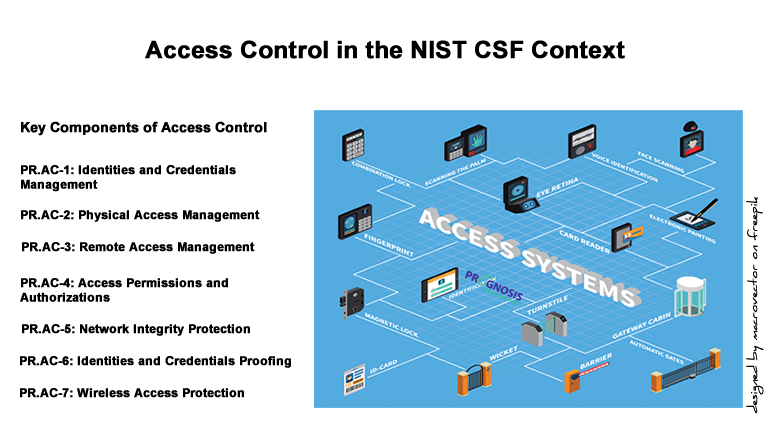
The NIST CSF’s Access Control category (PR.AC) includes seven subcategories that form the foundation of a comprehensive access control program:
PR.AC-1: Identities and Credentials Management – This involves issuing, managing, verifying, revoking, and auditing credentials for authorized users, devices, and processes. For Austin businesses, this might mean implementing a centralized identity management system that handles everything from employee badges to application access.
PR.AC-2: Physical Access Management – Physical access to your Austin office, data centers, or facilities is managed for employees and visitors. This includes everything from keycard systems at your downtown office to biometric scanners at server facilities.
PR.AC-3: Remote Access Management – Given Austin’s embrace of remote work and distributed teams, managing remote access to your systems is crucial. This includes VPNs, remote desktop solutions, and cloud access.
PR.AC-4: Access Permissions and Authorizations – Permissions are managed consistently with the principle of least privilege and role-based access control. An accounting clerk doesn’t need access to engineering systems, and vice versa.
PR.AC-5: Network Integrity Protection – Network segregation and segmentation ensure that even if one part of your system is compromised, the damage doesn’t spread everywhere.
PR.AC-6: Identities and Credentials Proofing – This involves verifying that people are who they claim to be before granting access—increasingly important in our world of social engineering attacks.
PR.AC-7: Wireless Access Protection – Wireless access is protected, managed, and monitored—critical for Austin businesses where coffee shop work sessions and bring-your-own-device policies are common.
Understanding the IAAA Lifecycle in Access Control
One framework that works hand-in-hand with the NIST CSF is the IAAA lifecycle (sometimes called AAA or IAAA). This represents the four fundamental processes of access control:
Identification: This is where users claim their identity—entering a username, scanning a badge, or presenting a biometric marker like a fingerprint. At your Austin office, this might be an employee swiping their badge at the door.
Authentication: Here, the system verifies that users are who they claim to be. This could be entering a password, receiving a code on your phone (multi-factor authentication), or using a fingerprint scanner. Think of this as the system asking, “Can you prove you’re really you?”
Authorization: Once authenticated, the system determines what resources you’re allowed to access and what actions you can perform. A sales team member might access customer data but not financial systems; a manager might approve purchases up to a certain limit.
Accounting (or Auditing): This involves tracking and logging what users actually do with their access. These logs create an audit trail showing who accessed what, when, and what they did—essential for both security monitoring and compliance reporting.
This lifecycle operates continuously. When your marketing coordinator in South Austin logs into your CRM system, they’re identified by their username, authenticated by their password and phone-based verification code, authorized to view customer contacts but not financial records, and all their activities are logged for future audit.
Implementing Effective Access Control Policies
For Austin organizations looking to implement or improve their access control policies in alignment with the NIST CSF, here’s a practical roadmap:
Start with a Risk Assessment: Understand what assets you’re protecting and what threats you face. An Austin-based healthcare startup faces different risks than a local government agency.
Apply the Principle of Least Privilege: Grant users only the minimum access they need to perform their jobs. This single principle, if consistently applied, prevents countless security incidents.
Implement Role-Based Access Control (RBAC): Instead of managing permissions for each individual, create roles (like “accountant,” “salesperson,” or “IT administrator”) with appropriate permissions, then assign users to roles.
Require Multi-Factor Authentication (MFA): Passwords alone are no longer sufficient. Implement MFA for all remote access and sensitive systems—it’s one of the most effective controls available.
Regularly Review and Revoke Access: When employees change roles or leave your organization, their access should change or end immediately. Schedule quarterly access reviews to catch orphaned accounts.
Document Everything: Your access control policies should be clearly documented, communicated to all staff, and regularly updated. This documentation is essential for both security and compliance.
Implement Segregation of Duties: For sensitive processes, ensure that no single person can complete a critical transaction alone—like financial transfers or system configuration changes.
Monitor and Log Access Activities: Implement logging for all access attempts and regularly review these logs for anomalies. Automated alerting can flag suspicious patterns.
Real-World Access Control Examples
Access control isn’t just an IT concept—it’s woven into our daily lives in ways we often don’t notice:
Your Home: Your house key is identification and authentication; certain rooms might be off-limits to guests (authorization); and a video doorbell logs who comes and goes (accounting).
Your Smartphone: Your fingerprint or face unlocks it (authentication); certain apps might require additional passwords (authorization); and your phone logs all app usage (accounting).
A Concert at Moody Center: Your ticket identifies and authorizes you to enter; different ticket types give access to different seating areas; and scanning your ticket creates a log of entry.
Banking: Your debit card and PIN authenticate you; your account type determines whether you can make international transfers; and the bank logs every transaction.
These same principles scale up to protect everything from small Austin startups to major enterprises.
Navigating Regulatory Challenges
Austin organizations face a complex regulatory landscape that makes access control not just good practice but a legal requirement:
Federal Regulations:
- HIPAA (Health Insurance Portability and Accountability Act): Healthcare providers throughout Austin must implement access controls that limit who can view protected health information (PHI). The Security Rule specifically requires access control measures aligned with NIST CSF subcategories PR.AC-1, PR.AC-3, and PR.AC-4.
- PCI DSS (Payment Card Industry Data Security Standard): Any Austin business accepting credit cards must restrict access to cardholder data. Requirement 7 of PCI DSS mandates role-based access control.
- GLBA (Gramm-Leach-Bliley Act): Financial institutions must protect customer data through access controls and authentication measures.
Texas State Regulations:
- Texas Identity Theft Enforcement and Protection Act: Requires businesses to implement reasonable procedures to protect sensitive personal information, including access controls.
- Texas Administrative Code Title 1, Chapter 202: Mandates security controls for state agencies that can serve as a benchmark for private organizations.
Industry-Specific Challenges:
Austin’s diverse economy means different sectors face unique challenges. Healthcare providers must balance accessibility for emergency situations with strict privacy requirements. Tech companies must protect intellectual property while enabling collaborative development. Financial services firms must prevent fraud while ensuring customer convenience.
Consequences of Poor Access Control
The costs of inadequate access control extend far beyond theoretical risks. Let’s look at real-world consequences across various industries:
Healthcare: In 2020, a national healthcare provider experienced a breach when unauthorized individuals gained access to employee email accounts, exposing the personal and medical information of over 200,000 patients. The organization faced not only HIPAA fines exceeding $1 million but also reputational damage and class-action lawsuits. For an Austin medical practice, a similar breach could be devastating.
Financial Services: A regional financial institution discovered that a former employee had maintained access to customer accounts for three months after termination, resulting in fraudulent transfers totaling $400,000. The failure to revoke access promptly (PR.AC-4) led to regulatory sanctions, customer losses, and damaged trust.
Retail: A major retailer’s breach in 2013 compromised 40 million payment cards because contractors had excessive network access. Starting with HVAC system credentials, attackers pivoted to payment systems—a failure of network segmentation (PR.AC-5) that cost the company over $200 million.
Education: A Texas school district experienced a ransomware attack when an employee’s compromised credentials allowed attackers to access and encrypt critical systems. The lack of multi-factor authentication (PR.AC-7) and privileged access management led to weeks of system downtime during the school year.
Technology: A software company’s proprietary code was stolen when a departing employee retained access to code repositories for weeks after resignation, later sharing it with a competitor. The resulting litigation and competitive disadvantage illustrated the importance of immediate access revocation.
For Austin businesses, these aren’t distant cautionary tales—they’re scenarios that could unfold at any organization that doesn’t prioritize access control.
Best Practices for Access Control Excellence
Based on the NIST CSF and real-world experience helping Austin organizations, here are my top recommendations:
1. Embrace Zero Trust Architecture: Assume breach and verify every access request, regardless of where it originates. Austin’s distributed workforce makes this approach increasingly relevant.
2. Automate Onboarding and Offboarding: Use identity management systems to automatically provision and deprovision access based on HR system triggers.
3. Implement Privileged Access Management (PAM): Administrative accounts deserve special scrutiny and protection. Use PAM solutions to manage, monitor, and record privileged sessions.
4. Conduct Regular Access Certification: Quarterly, have managers certify that their team members still need their current access levels.
5. Provide Security Awareness Training: Your access control is only as strong as your users’ security awareness. Regular training helps prevent social engineering and credential theft.
6. Use Single Sign-On (SSO): Consolidate authentication through SSO to reduce password fatigue while maintaining security and improving user experience.
7. Implement Continuous Monitoring: Deploy User and Entity Behavior Analytics (UEBA) to detect anomalous access patterns that might indicate compromise.
8. Plan for Incident Response: Even with strong access controls, prepare for potential compromises with a documented incident response plan.
Tools for NIST CSF Compliance Evaluation
Austin organizations have access to excellent tools for implementing and evaluating access control aligned with the NIST CSF:
Identity and Access Management (IAM):
- Okta: Cloud-based identity management with strong SSO and MFA capabilities
- Microsoft Azure Active Directory: Comprehensive identity platform integrated with Microsoft ecosystem
- JumpCloud: Directory-as-a-Service particularly suited for small to medium businesses
Privileged Access Management:
- CyberArk: Enterprise-grade PAM for protecting privileged credentials
- BeyondTrust: Comprehensive privileged access management and remote access solutions
NIST CSF Assessment Tools:
- Tenable.io: Vulnerability management platform with NIST CSF mapping
- Rapid7 InsightVM: Vulnerability management with compliance reporting including NIST CSF
- Nessus Professional: Vulnerability scanner that can assess controls aligned with NIST CSF
Compliance Management Platforms:
- Drata: Automates compliance monitoring including NIST CSF assessment
- Vanta: Streamlines security and compliance workflows with NIST CSF mapping
- AuditBoard: Governance, risk, and compliance platform for enterprise organizations
Open-Source Options:
- NIST Cybersecurity Framework Tools from NIST itself provide free assessment methodologies
- OpenIAM: Open-source identity management platform for organizations with technical expertise
For Austin businesses just beginning their NIST CSF journey, I often recommend starting with a professional assessment to establish a baseline, then implementing tools appropriate to your organization’s size, complexity, and budget.
Moving Forward with Confidence
Access control is fundamental to protecting your Austin organization’s most valuable assets—your data, your systems, your reputation, and your customers’ trust. By aligning your access control program with the NIST Cybersecurity Framework’s Protect function, you’re not just checking compliance boxes; you’re building a resilient security foundation that can adapt as your organization grows, and threats evolve.
The NIST CSF’s beauty lies in its flexibility. Whether you’re a five-person startup in a co-working space on East 6th Street or an established enterprise with offices throughout the Austin metro area, the framework scales to meet your needs. Start where you are, focus on your highest risks, and continuously improve.
Remember, cybersecurity isn’t about perfection—it’s about progress. Every access control improvement, from implementing MFA to conducting access reviews, strengthens your security posture and reduces risk.
Take the Next Step
If you’re an Austin-area organization wondering where you stand with access control and NIST CSF compliance, let’s talk. I offer a complimentary 15-minute discovery call where we can discuss your specific situation, challenges, and goals—with no sales pressure, just practical guidance from someone who understands both the technical requirements and the Austin business landscape.
Schedule Your Free 15-Minute Discovery Call Today
Together, we can ensure your organization has the access controls in place to protect what matters most while enabling your team to do their best work.
Sources and References
- National Institute of Standards and Technology. (2018). “Framework for Improving Critical Infrastructure Cybersecurity, Version 1.1” – https://www.nist.gov/cyberframework
- U.S. Department of Health and Human Services. “HIPAA Security Rule” – https://www.hhs.gov/hipaa/for-professionals/security/index.html
- PCI Security Standards Council. “PCI DSS Quick Reference Guide” – https://www.pcisecuritystandards.org/
- Texas State Legislature. “Business & Commerce Code Chapter 521: Identity Theft Enforcement and Protection Act” – https://statutes.capitol.texas.gov/
- Center for Internet Security. “CIS Controls Version 8” – https://www.cisecurity.org/controls
- Identity Defined Security Alliance (IDSA). “2023 Identity Security Trends” – https://www.idsalliance.org/
About the Author: Daniel Ihonvbere, CISM, CISSP is a Risk Management and GRC expert with 15+ years of experience helping organizations and businesses navigate technological transformation and complex regulatory guidelines and frameworks.
