Cyber Protection Essentials Small Organizations Need To Know About

In today’s data driven economy, safeguarding that data is vital for the survival of organizations and businesses. It is important then, that these organizations, especially small and medium-sized ones, learn all they can about cyber protection.

Cyber protection for various components of a computer network

Whether your organization or business is commercial printing, a nonprofit, or membership association, the fact is that advances in modern technology has disrupted and reinvented nearly every facet of what drives the global economy.

The world is more dependent upon data today than at any time in history. Correspondingly, safeguarding data – and the applications and systems that rely on such data – is vital for individuals and organizations alike. It is important then, that organizations, especially small and medium-sized ones, learn all they can about cyber protection.

Although IT professionals have long preached about the importance of data backups and cyber protection, unfortunately, traditional backup and cyber security solutions are no longer enough because they cannot keep up with the advanced threats facing businesses today. And here is why:

Read more

Share

Security Warning For Businesses Running Windows 7

URGENT Security Warning For Businesses Running Windows 7. Microsoft is ending support for the operating system starting January 14, 2020.

Tech Prognosis technician working on a Windows 7 computer

Your computer network is more important than ever. And so are the computers powering your business or organization. This is especially true if your computer network is still running Microsoft’s  Windows 7 operating system which the company plans to retire support for on January 14, 2020.

Not only does that mean that any computer with the operating system installed will be completely exposed to serious hacker attacks aimed at taking control of your network, it also means that business data will be exposed to theft, computer system crashes and the possibilities of a host of other business-crippling problems you do NOT want to have to deal with.

Read more

Share

The Case For A Unified Threat Manager On Small Business Networks

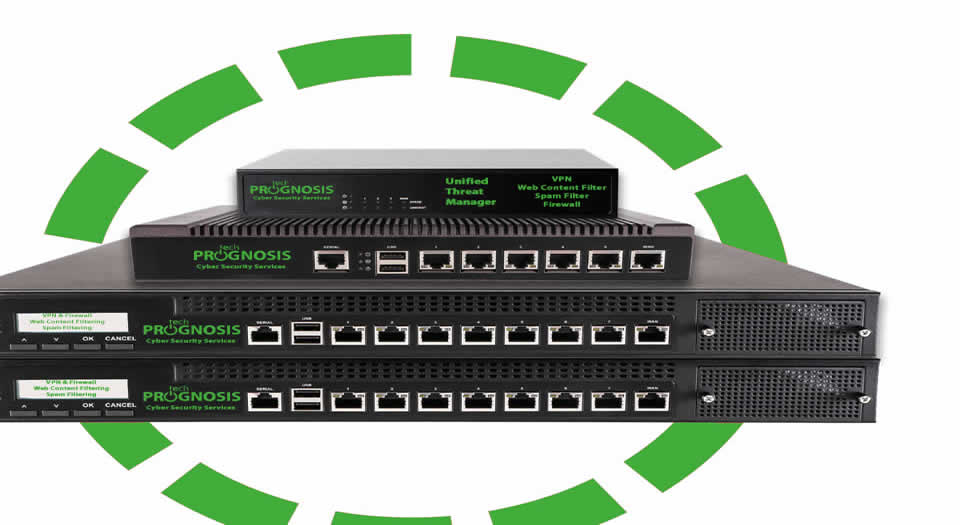
A Unified Threat Manager Appliance

Using a consumer router to power internet connectivity in a small business or organization could be an open invitation to hackers looking to steal business-critical information. To provide advanced security and protection from cyber crime, a Unified Threat Manager or UTM is needed.

While a router provides an easy way to get online, did you know that it can also give hackers an easy way to steal from your business?
A quick search for ”router exploits” in your favorite search engine will produce a long list of security flaws in most routers, some discovered only months ago.

Once hackers are in your network, anything goes. They can steal your customer records, inject spyware, and even empty your bank accounts. A major breach can wipe out a small business in less than a day.

Read more

Share

Your Small Business or Organization Is A Big Target For Cyber Crime

Protect your business from being a target for cyber crime before it’s too late.

Image of a hacker engaged in cyber crime

Small business owners used to have to watch for thieves who worked at night and carried a crowbar. Today, they are under attack by criminals on computers that are thousands of miles away.

Many attacks on small businesses are done with malware. First, the malicious software lands on a computer at the business. Then it quietly gathers data, such as credit card information, and sends it secretly to thieves over the internet.

Once a thief has the data, he can quickly turn it into cash. He can sell it on the black market, or he can make purchases and phony credit cards. The end result is the same: the business’ bank accounts are emptied, and the thief never even sees the building.

Your Business Or Organization Is A Target

The news headlines are filled with cyber attacks on big retailers. But small businesses are far more likely to be hacked. Why? Because most have almost no network security. They are an easy payday or what Kevin Fream calls “easy prey” for cyber thieves.

Read more

Share

Web Browser Extensions Caught Spying On Chrome and Firefox Users

Representation of data transfer due to web browser extension spying.

Not too long ago, we warned users about why some online ads they see seem to be precisely targeted to their tastes and interests, including the spooky tendencies of websites remembering browsing and shopping preferences from visit to visit or device to device. It turns out that Avast and its recently acquired AVG, have been doing a lot of background spying and data pilfering through their “free” web browser plugins.

Data pilfering is widespread and very profitable, and data thieves seem to have no problem getting willing “victims” counting the number of people using “free” products that come with all kinds of terms and conditions. So much so that some even boast of the ability to provide “[I]ncredibly detailed clickstream data from 100 million global online shoppers and 20 million global app users” that advertisers can analyze “…however you want: track what users searched for, how they interacted with a particular brand or product, and what they bought. Look into any category, country, or domain.”

All from a user looking for a solution to protect them from online threats and installing a web browser extension that is supposed to protect them from such invasion of privacy.

As reported by the creator of Adblock Plus, Wladimir Palant, Avast has been spying on the users of their antivirus products, and appears to have been doing so for years, through their Avast Online Security web browser extension which is promoted as having the ability to provide “maximum protection” from spyware and other online dangers.

The sad fact is that sometimes, users are not even aware that they have the extension because the Avast Secure Browser has Avast Online Security installed by default and is hidden from the extension listing and cannot be uninstalled by regular means.

Read more

Share

Benefits of Device-as-a-Service or DaaS for Small Businesses

multiple daas - Device-as-a-Service device options

DaaS can assist in providing an end-to-end solutions, including hardware, peripherals, and managed services to simplify and reduce overall IT costs.

When we think of work and the devices we use for work, many of us will readily mention a desktop computer, or a laptop and move on. Not too long ago, the “corporate” way of doing work was to rely on a particular device, say a desktop computer device that had enough ‘power user’ specifications, to ensure productivity. Laptops were not the main stay of any ‘serious worker’ since they were under powered and super expensive to warrant purchasing it for business use.

Today, thanks to cloud services like Amazon’s AWS, Google’s G Suite of productivity apps, Microsoft’s Office 365 and Azure, and the availability and stability of high-speed internet access, it is now possible to offload much of the work that needed powerful computers to the cloud.

That means that no matter which device we use, we are now able to transition work between devices and have the confidence that everything will be in-sync. In addition, it is also now possible for less powerful devices (like a Chromebook, for example) to become much more capable by tapping into file systems hosted in the cloud.

However, according to Forrester Research, about 74 percent of information workers use two or more devices for work — and 52 percent use three or more! To top it off, it is estimated that about 14 percent of employees use six or more corporate-issued or approved tech devices.

These devices include what Brian Hughes calls “the battlewagon” – company laptop, workstation/desktop computer, company provisioned mobile phone, Voice-over-IP (VoIP) desk phone, personal mobile phone, and a couple of tablet computers of varying sizes and use-cases.

Read more

Share
Share
Share