Virtualization and the Small Business Owner (2026 Edition)

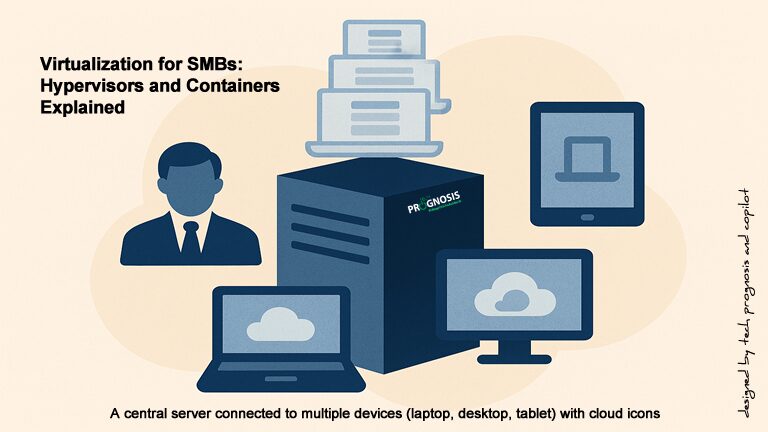
Illustration of a central server connected to multiple devices (laptop, desktop, tablet) with cloud icons, symbolizing virtualization and hybrid cloud integration for small businesses.

How Small Businesses Can Use Virtualization in 2026

Virtualization has moved from “promising” to practical and pervasive. In 2009, running six servers on 8 GB of RAM felt remarkable. Today, consolidation, hybrid cloud, containerization, and Desktop‑as‑a‑Service (DaaS) make modern small‑business IT more scalable, secure, and cost‑aware than ever. This guide shows how to choose—and succeed with—the right mix of virtual machines (VMs), containers, and cloud desktops for your business.

1) What “Virtualization” Means Today

Virtual machines (VMs) still anchor most business workloads. A hypervisor (like Hyper‑V, KVM, or VMware by Broadcom’s vSphere) runs multiple guest operating systems on one physical host, isolating workloads while boosting utilization. Linux’s KVM is built into the kernel, delivering near‑native performance for many workloads and supporting both x86 and Arm hosts. [kernel.org]

Read more

Share

Device as a Service: How To Simplify IT Hardware Replacements

Device as a service computer hardware components

Device as a Service offers complete IT hardware, software, and services solution for a regular predictable monthly fee.

The business environment is changing, even more so in these past few months of a health pandemic. Business owners and leaders want to pay for exactly what they want, when they want it, and eliminate unnecessary waste. They no longer want mass market products but complete customization to fit their specific needs.

Due to this increasing demand for customization, new business models have arisen to accommodate them, and the consumption model will naturally continue to spread into nontraditional industries.

What is the Technology Lifecycle?

A technology lifecycle is technically defined as the span of a product’s existence from its initial development through the period of marketing and active use to eventual obsolescence. It is the beginning to end process of acquiring, installing, maintaining, tracking and the retirement of an asset in a business environment. These assets could be servers, laptops, desktop computer, tablets, or mobile phones.

Typically, a technology’s lifecycle can be extended through ongoing maintenance, updates and upgrades. Upon reaching the end of its most effective stage, the IT lifecycle moves to replacement, decommission and salvage.

For organizations large and small, refreshing a fleet of personal computing devices every 3 to 4 years can involve substantial costs, especially when considering peripheral expenditures for procurement, deployment, training, support, recovery, and asset management.

This is where Device as a Service, commonly known as DaaS comes in.

Read more

Share

How to Recover Your Lost Computer Files Easily

Technicians working on a hard drive to recover lost computer files

We maintain our computers similarly to how we maintain our own health – rarely do we take the time to learn about preventing health complications, and instead work to repair our health once we’ve become ill! Rarely do we plan on how to recover lost computer files when disaster strikes.

We take care of our computers the same way, in that we rarely think about the safety or well-being of our data until something happens that leads to data loss or corruption. And when that does happen, how do you recover your lost computer files?

Have you ever taken a moment to imagine what would happen if you lost some or all of your computer files? Whether you only use your computer for personal reasons; or for school or work, file or data loss can be devastating!

Think of all of those business images and family photographs, music files or class assignments! Think of the business report you and your team spent weeks working on.

Read more

Share

The Business Case for EndPoint Security in Small Organizations

According to BAE Systems, almost 50 percent of small businesses have experienced a cyber attack, and as much as 60 percent of hacked small- and medium-sized businesses go out of business after six months. By deploying endpoint security solutions, most cyber attack attempts can be prevented.

Devices and services protected by endpoint security solutions

Faced with limited IT personnel and budget, small business environment usually end up with non-standard computer configurations, inadequate or non-existent security policies, old equipment etc.

The impact of the failure of an endpoint on business processes can be a little scary sometimes. A good example is a call I got from a friend the other day. The boss’s computer had a couple of viruses and they had to disconnect the computer from the network.

Of course that meant business had to come to a halt because everything was on the boss’s computer. There were no anti-virus software on any of the workstations and of course no firewall of any kind, so it was free for all.

Read more

Share

How To Keep Your Computer Network Up, Running, And Problem FREE


Problem-free Computer Network

In order to stay ahead of the constant threats posed by cyber attacks, keep their customers satisfied, and stay profitable, businesses and organizations have to make sure that their computer networks are up, running, secure and problem-free.

Are you frustrated with on-going computer problems – slow machines, error messages, viruses, spyware, printers not working, applications crashing, and other issues that drive you nuts? You are not alone!

Several small and medium sized business (SMB) owners struggle with this problem all the time, primarily because of resource constraints – small staff, limited budget, and the high cost of hiring a skilled IT expert etc.

But there are those who have figured out a way to completely ELIMINATE those problems from cropping up, finally and forever…and it didn’t cost them a dime.

The Best Way To Deal With A Computer Problem?

Read more

Share

Know Your Computer Network Before Hiring An IT Service Provider

Image of Computer Network Assessment ScanningDo You Know Your Computer Network? The often overlooked and sometimes taken for granted software and hardware that make things happen daily for your business or organization. The computers and laptops, servers and switches, firewalls, the power strip etc. How much of your computer network environment do you actually know?

First of all, it is a fact that the cost of doing business has made it a tough going for many small organizations. Therefore, as CEOs of small businesses and Executive Directors of nonprofit organizations are contemplating how to keep customers, employees and donors happy, a lot of offers are bound to be presented, all promising to save cost and provide I.T. nirvana.

For that reason, before you throw the doors open for service providers to come to your environment and start mucking around, it may be a good time to backup for a minute and take time to ask yourself these few questions:

Do you know what you have, in terms of computer network infrastructure?

  • Do you know your hardware and software?
    If the answer is no, maybe or not sure, start the documentation process now. You should know your network devices, operating systems and software programs.
  • Do you know the difference between a home router and an enterprise router?
    If you are using consumer brands like D-Link, Netgear, or Linksys routers to connect your commuter network devices, the answer is probably “No”.
    While such routers are great to connect home networks to the Internet, they are probably not the best option for most midsize businesses. Almost all of these types of routers do not have capabilities for enterprise grade management. Furthermore, they lack troubleshooting features, and for that reason, they have weak performance capabilities, reliability options, and above all, lack the protocols and modules required for most company networks.

Read more

Share
Share
Share