How Software Vendors Encourage The Use Of Insecure Legacy Applications

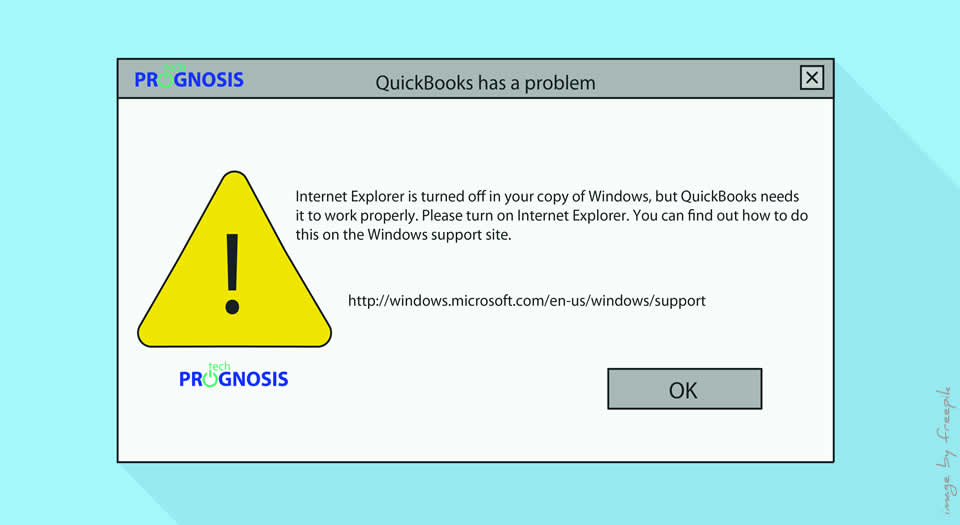
QuickBooks "Internet Explorer is turned off" Error Message

Generally speaking, it is a common practice among IT professionals to associate bad user experience and clunky User Interfaces with legacy applications, and we bemoan the reluctance of users to use new and modern applications “that are right there.”

As a matter of fact, while we very often lament the refusal of technology users to wean themselves away from using legacy or outdated applications, the reality could be that sometimes, users have no choice in the matter: use legacy apps, or productivity comes to a screeching halt.

What Is A Legacy Application?

A legacy application (legacy app) is a software program that is outdated or obsolete. Although a legacy app still works, it may be unstable because of compatibility issues with current operating systems (OSes), browsers and information technology (IT) infrastructures. – – Definition from TechTarget

For example, at the start of 2016, Microsoft ended support for all versions of Internet Explorer (IE) prior to version 11. Users still browsing with older versions like IE 6 could continue to do so, but website pages were no longer going to be coded to be compatible, and any bugs or errors within the Internet Explorer program will not receive attention from Microsoft.

Read more

Share

Safeguard Your Organization From Evolving Cyber Threats

Safeguard depiction for cloud services, file folder and laptop

Businesses today face a constantly evolving set of potential threats, from data security breaches to downtime from unexpected events. To safeguard your organization from evolving cyber threats, use solutions that help protect your business data and minimize the disruptions caused by unexpected events.

Against the backdrop of these evolving threats, businesses and organizations are asking critical questions like:

  • With growing use of the cloud and mobile devices at work, how can we keep business data protected?
  • As my data grows, how can I make sure it is all backed up without spending a fortune?
  • If an unexpected event occurred, like a fire, physical break-in, flood, or cyber attack, how long would it take our business to get back online?
  • What would this downtime cost our business?
  • How do we keep up with a constantly changing compliance landscape?

To safeguard your business and organization from increasingly sophisticated cyber and internal threats to data, it is imperative that modern protection for evolving threats be put in place with emphasis on solutions that help protect critical business data and minimize the disruptions caused by unexpected events.

Read more

Share

Proactive Technology Management As Money Saver For Small Businesses

Computer network administrator working with many applications in a proactive technology management environment.

Every dollar a small business spends needs to have an immediate and quantifiable return. This is especially true for critical services such as I.T. support. If you are one of the millions of small businesses that depend upon your technology to keep your business running, proactive Technology Management will save you money, improve your efficiencies and reduce your downtime.

The Solution

With the advent of new monitoring tools and the ability to remotely deliver help desk services to small businesses all over the world, Managed IT Services Providers have developed proactive Technology Management plans for their clients that maximize their uptime and reduce I.T. costs over time. By implementing newly available automated processes, systems can be patched and updated overnight without the need for onsite visits, or disrupting an organization’s work day.

Read more

Share

Common Business Scams and How Your Organization Can Avoid Them

Preventing Business Scams Image by Tech Prognosis

Business scams by con artists are not new and seem to be evolving every day. You probably already know about, or have had some experience with, the most common ones – robocalls about winning a prize, computer problems, quick credit fix etc. Sometimes, it is an “invoice” that is supposedly from a business partner.

And in some cases, a business scam can come in the form of debt-collection notices, or dire warnings about an expiring web address, domain name or trademark if you don’t send money immediately.

There have even been reports of business scams involving toner cartridges or other office supplies showing up at offices out of the blue with a bogus bill.

The common thread with all business scams is that they attempt to sow fear, play on greed or plea to the kind-heartedness of people.

According to the Federal Trade Commission (FTC), these business scams by con artists succeed because the criminals are banking on the likelihood that most small and medium-sized businesses, churches, and not-for-profit groups will end up paying the bogus invoices in the mistaken belief they owe money or that it’s simply a misunderstanding.

The devastating aftermath of successful business scams though, is that the savings of many businesses and organizations are plundered before the scam is discovered. And the sad part of it all is that many are never caught thus making the scam industry a multi-billion-dollar enterprise. Research put it at over $50 billion annually.

Read more

Share

Credential Management Vulnerabilities Exposed By Breaches

Credential Management BreachThe recent breach of OneLogin is once again shining the spotlight on the safety and sanity of entrusting sensitive data to cloud-based credential management services. OneLogin provides single sign-on for cloud-based applications.

What Is A Credential Management Service?

Credential management services that offer Single Sign-On or SSO are great, but as we are beginning to find out, it could also be a single point of entry to a treasure trove of sensitive data for cyber criminals.

How Does A Credential Management Service Work?

The way credential management services work is that after a user of these Identity and credential management services sign into their account, the service takes care of remembering and supplying the customer’s usernames and passwords for all of their other applications. It pretty much attempts to save the user the pain and stress of trying to remember numerous passwords, security questions and other hoops people normally have to jump through just to access some online services.

What Is The Problem With Credential Management Services?

While a lot of these services promise secure access to, and a simplified Identity and Access Management (IAM), the recent spate of multiple breaches of LastPass and now OneLogin makes us wonder just how efficient and  secure these credential management services really are. And here is why: a single compromise exposes the credentials of all users, especially if that data theft includes the ability to decrypt encrypted data [thanks to Mark Maunder of Wordfence for that emphasis].

A breach that allows intruders to decrypt customer data could be extremely damaging for affected customers.

The vulnerabilities in credential management services like LastPass were so bad that Tavis Ormandy, a security researcher at Google’s Project Zero wondered if people were “really using this lastpass thing” because he took a quick look and could see “a bunch of obvious critical problems”.

Read more

Share

How Nonprofits And Associations Can Prevent Ransomware Like WannaCry

Ransomware Prevention

On Friday May 11, 2017, the world learned just how vulnerable computer networks can be when not fully protected as it experienced a well-coordinated ransomware attack, known as WannaCrypt, or WannaCry.

Note: Ransomware encrypts files and makes them unusable unless payment (ransom) is made within a specified time. Malware and ransomware like WannaCry prey on weaknesses in network security systems due to out-of-date firewalls, operating systems and antivirus programs.

Are You at Risk?

That worldwide attack caused Britain’s National Health Services to cancel surgeries, shut down at least 40 major organizations across more than 99 countries, including a wide array of Russian and Chinese private and public institutions.
By the time the dust settled, this large world-wide cyber-attack, described by Europol as unprecedented in scale, infected more than 230,000 computers in over 150 countries.

Unlike previous ransomware, this attack did not spread by phishing emails, but used a leaked hacking tool or exploit called EternalBlue that was developed by the U.S. National Security Agency (NSA) to spread. The target of the ransomware were computer networks which had not installed recent software security updates (also commonly known as patching).

Read more

Share
Share
Share