
Fake Travel Confirmation Emails That Could Breach Your Law Firm

A lady in a red dress and travel suitcase is talking with an air travel booking agent with an airplane image in the background. There is a highlight of the damage a single successful phishing attack from fake travel confirmation emails can cause.

🎯Fake Travel Confirmation Emails: Legal Professionals in Austin, Don’t Let Fake Emails Breach Your Law Firm

Planning a summer getaway? Cybercriminals are planning their next move, too—and your law firm may be the target.

As a cybersecurity professional, I see it all the time. Fake travel confirmation emails land in someone’s inbox, dressed up to look like they are from Delta, Marriott, or Expedia. The logo checks out. The formatting is perfect. The subject line sounds urgent. And then—click. Just like that, login credentials or credit card data are in the hands of cybercriminals.

In fact, 83% of organizations experienced a phishing attack in 2023, according to Proofpoint’s State of the Phish Report. And summer travel season is a gold mine for scammers.

Read more

Share

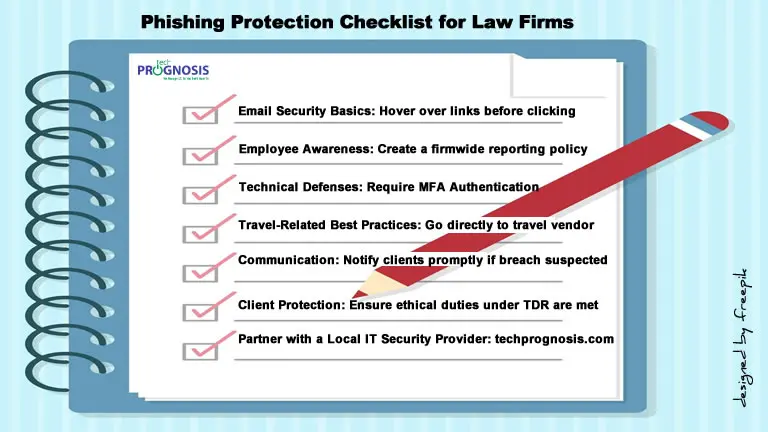
Phishing Protection Checklist for Law Firms

Texts in book binder format of critical phishing protection checklist for law firms.

Phishing Protection Checklist for Law Firms

Safeguard Your Legal Practice from Email Scams—Especially During Travel Season

Below is a Downloadable Phishing Protection Checklist tailored for law firms in the Austin, Texas area. It’s designed to help your legal team quickly spot phishing scams—especially travel-related ones—and take proactive steps to protect confidential data, client trust, and firm finances.

đź”’ Email Safety Basics

✔️ Double-check sender email addresses before opening messages
✔️ Never click links in unexpected travel confirmation emails
✔️ Avoid downloading attachments unless verified
✔️ Hover over hyperlinks to see the actual destination URL
✔️ Use a spam filter and block known malicious domains

Read more

Share

Natural Disasters and Malicious Activities: How to Protect Your Business and Yourself

Simulation of malicious activities after natural disasters like phishing and a cybercriminal stealing password.

In the wake of natural disasters, people and organizations are often focused on recovery, safety, and rebuilding. Unfortunately, cybercriminals see these times of crisis as prime opportunities to exploit vulnerabilities. Whether through phishing emails, malware attacks, or fraudulent schemes, malicious actors strike when defenses are down and emotions are high. Understanding how to avoid falling victim to these cyber threats is essential for both individuals and businesses as they recover from disasters.

In this article, we’ll explore the common cyber risks that arise after natural disasters, how to recognize them, and practical steps you can take to protect yourself and your business. We’ll also highlight some valuable resources available to help you stay safe online during these challenging times.

Read more

Share

7 Common Technology Challenges Small Business Owners Face (And How to Overcome Them)

Image of maze game with space theme depicting the 7 common technology challenges small business owners face.

7 Common Technology Challenges Small Business Owners Face (And How to Overcome Them)

Technology is now a cornerstone for small businesses, empowering them to compete in a dynamic market. It plays a vital role in the success of small businesses. However, with the rapid advancements and ever-evolving landscape, small business owners often find themselves facing a myriad of challenges. From cybersecurity threats to outdated systems, these obstacles can hinder productivity and growth.

In this article, we’ll explore seven common technology problems faced by small business owners and provide practical solutions to overcome them.

Read more

Share

Spam: Strategies For Reducing Unsolicited Emails

Mail box with no spam sign

Spam is a common, and often frustrating, side effect to having an email account. Although you will probably not be able to eliminate it, there are ways to reduce it.

What is spam?

Spam is the electronic version of “junk mail.” The term spam refers to unsolicited, often unwanted, email messages. Spam does not necessarily contain viruses so some valid messages from legitimate sources could fall into this category.

How can you reduce the amount of spam?

  • Be careful about releasing your email address

    Think twice before you respond to any request for your email address, on the web, verbally, or on paper.
    Spammers can harvest any email address posted on a website or buy a list of victims from unscrupulous vendors who sell their mailing list.
    When you give your email address to a company, or a store, that information is often entered into a database so that customer information and preferences can be tracked. If these email databases are sold to or shared with other companies, you can receive email that you didn’t request.
    So the next time you make a purchase and they ask you whether you want an emailed or a printed receipt, choose “Print only”.

Read more

Share

Identity Theft: Preventing and Responding to Identity Fraud

Identity theft: a criminal running away with stolen personal information from a compromised tablet computer.

Following the recent public disclosure that hackers believed to be operating on behalf of a foreign government breached the networks of the U.S. government and multiple US companies, it is safe to assume that online frauds and scams like identity theft will follow.

Identity theft, or identity fraud, is a crime that can have substantial financial and emotional consequences. Take precautions with personal information. If you become a victim, act immediately to minimize the damage.

Is identity theft just a problem for people who submit information online?

You can be a victim of identity theft even if you never use a computer. Malicious people may be able to obtain personal information (such as credit card numbers, phone numbers, account numbers, and addresses) by stealing your wallet, overhearing a phone conversation, rummaging through your trash (a practice known as dumpster diving), or picking up a receipt at a restaurant that has your account number on it.

If a thief has enough information, he or she may be able to impersonate you to purchase items, open new accounts, or apply for loans.

The internet has made it easier for thieves to obtain personal and financial data. Most companies and other institutions store information about their clients in databases; if a thief can access that database, he or she can obtain information about many people at once rather than focus on one person at a time.

The internet has also made it easier for thieves to sell or trade the information, making it more difficult for law enforcement to identify and apprehend the criminals.

Read more

Share
Share
Share