Windows 10 End of Support: What Happens To Healthcare Applications

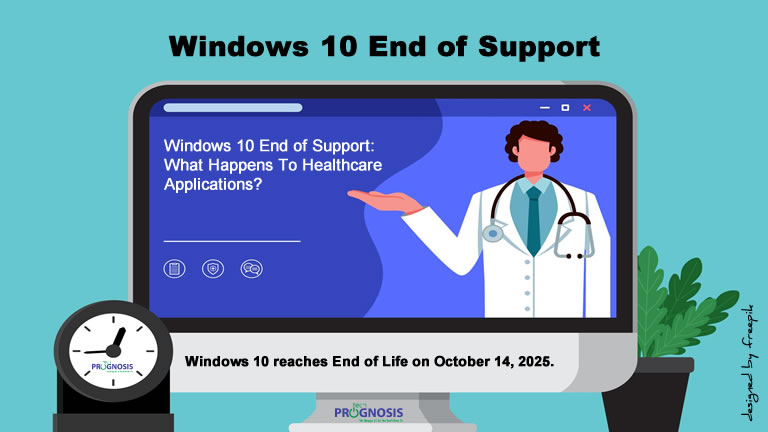
A computer desktop monitor showing an image of a doctor with a stethoscope around his neck gesturing toward a text on the screen asking the question: "Windows 10 End of Support: What Happens to Healthcare Applications”

What Happens to Healthcare Applications After Windows 10 End of Support?

A Cybersecurity Expert’s Guide for Clinics, Practices, and Health Systems

📅 October 14, 2025 is more than just a date on the calendar. It’s when Windows 10 reaches end of life, and with that, your healthcare IT environment could be at serious risk.

Whether you’re a small practice using EHR software on a few desktops or a larger provider with integrated patient care systems, the end of Windows 10 support could expose your patients’ data, impact compliance with HIPAA, and disrupt care delivery.

If you’re still using Windows 10 after the cutoff date, it’s not just your operating system that will be at risk – your critical healthcare applications could be affected too. Let’s break down what you need to know.

Read more

Share

IT Audit Planning Process: A Comprehensive Guide

Time management concept with planning time symbols isometric with businesspeople looking at a planning board simulating an IT audit planning process as a systematic sequence of steps.

In today’s fast-paced digital landscape, effective Information Technology (IT) audit planning is more than a checkbox exercise—it’s a strategic imperative. Whether you’re a small nonprofit, a growing manufacturing firm, or a large healthcare organization, a well-structured IT audit plan helps ensure your systems are secure, compliant, and aligned with business objectives. In this article, we’ll walk through the IT audit planning process from a Governance, Risk, and Compliance (GRC) expert’s perspective, spotlighting how it differs from risk assessment, exploring various audit types, tackling common challenges, and sharing best practices. We’ll also include a concrete, sector-specific example with timelines, and recommend popular tools to streamline your efforts.

Read more

Share

Phishing Protection Checklist for Law Firms

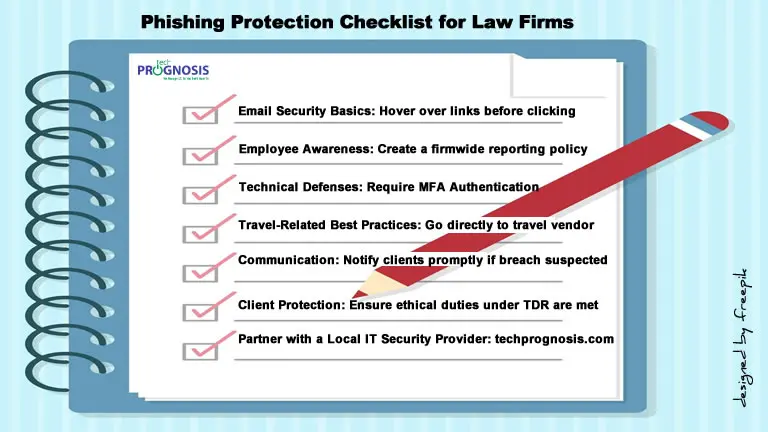
Texts in book binder format of critical phishing protection checklist for law firms.

Phishing Protection Checklist for Law Firms

Safeguard Your Legal Practice from Email Scams—Especially During Travel Season

Below is a Downloadable Phishing Protection Checklist tailored for law firms in the Austin, Texas area. It’s designed to help your legal team quickly spot phishing scams—especially travel-related ones—and take proactive steps to protect confidential data, client trust, and firm finances.

🔒 Email Safety Basics

✔️ Double-check sender email addresses before opening messages
✔️ Never click links in unexpected travel confirmation emails
✔️ Avoid downloading attachments unless verified
✔️ Hover over hyperlinks to see the actual destination URL
✔️ Use a spam filter and block known malicious domains

Read more

Share

Texas Cybersecurity Framework: Fortifying Your Texas Digital Fortress

Half-circle Infographic with text flyouts of the five functions of the Texas Cybersecurity Framework - Identify, Protect, Detect, Respond, and Recover.

Texas Cybersecurity Framework: A Deep Dive into Fortifying Your Texas Digital Fortress

As a GRC (Governance, Risk, and Compliance) expert, I’ve had the privilege of guiding many organizations through the sometimes-dusty trails of cybersecurity. And when it comes to securing digital assets right here in the Lone Star State, one framework consistently stands tall: the Texas Cybersecurity Framework (TCF).

Now, cybersecurity might sound like complicated tech-speak, but at its heart, it’s about protecting what matters most – your data, your operations, and the trust of your customers. Think of the TCF as a well-laid-out blueprint for building a strong and resilient digital fortress. It provides a clear roadmap to help organizations, both big and small, navigate the ever-evolving landscape of cyber threats.

In this deep dive, we’ll unpack the TCF in plain language, exploring its origins, how it’s structured, some of its key components, the hurdles organizations often face, and practical ways to get started. So, grab your virtual Stetson, and let’s get to it!

Read more

Share

Business Impact Analysis: Principles, Methodologies, Challenges, and Best Practices

Male and female looking at a simulated Business Impact Analysis (BIA) dashboard with a huge magnifying glass.

The Complete Guide to Business Impact Analysis (BIA): Principles, Methodologies, Challenges, and Best Practices

Let’s talk about something that might sound a bit dry at first – Business Impact Analysis, or BIA for short. But trust me, as someone who’s spent years in the trenches of Governance, Risk, and Compliance (GRC), I can tell you, this is anything but boring. In fact, it’s the superhero cape your organization needs to navigate the unexpected.

Imagine a sudden power outage, a supply chain disruption, or even a cyberattack. What happens next? Do you scramble in the dark, hoping things will magically sort themselves out? Or do you have a plan, a roadmap that guides you through the chaos? That roadmap is built on the foundation of a solid BIA.

BIA helps businesses identify critical functions, assess the potential impact of disruptions, and establish strategies to minimize the effects of disruptions on these functions. This guide dives deep into the concept and principles of BIA, highlighting its role in various sectors, methodologies, challenges, and best practices.

Read more

Share

True Cost of Neglecting IT (Information Technology) and Support

Illustration of essential IT investments concept with technology symbols and text of collaboration and communication, cloud computing and storage, cybersecurity, and secure remote work solutions as a remedy for organizations and businesses neglecting IT (Information Technology) and Support

Neglecting IT (Information Technology) and Support : The Make-Or-Break Factor Business Owners Overlook—Until It’s Too Late

A CIO’s Perspective on IT as a Growth Driver, Not Just a Cost

As the vCIO of a couple of businesses and organizations, I have seen firsthand how technology can be either a strategic enabler or a major roadblock. Too often, business owners focus on growth, sales, and customer experience while leaving IT decisions on the back burner—until something goes wrong.

For many business owners, IT is seen as a necessary expense rather than a strategic asset. But the reality is that your technology infrastructure directly impacts efficiency, security, and growth. Slow computer systems, dropped phone calls impacting sales, outdated software, or weak cybersecurity measures that leave an organization’s data vulnerable don’t just cause occasional frustration—they can create significant vulnerabilities that cost your business time, money, and reputation.

Here’s the hard truth: neglecting IT and support can cost your business more than you think—in lost productivity, security risks, and missed opportunities. The right technology isn’t just an operational necessity; it is a competitive advantage.

So, let me ask you: Is your IT helping your business grow, or is it quietly holding you back?

Read more

Share
Share
Share